 a PureHost product
What a sending service does for you
Your website or application usually sends email through its own server today. Many recipients don’t trust that email, so it ends up in the spam folder or never arrives. PureMails takes over sending: your application hands the email to us via SMTP, and we deliver it from your verified sender domain.
- Your applicationshop, website, software
- PureMailschecks login and sender, delivers
- Your customers’ inboxreliably delivered
Everything for clean delivery
Your application speaks plain SMTP. We take care of deliverability, authentication and availability.
- Professional delivery
- Every message leaves through an established sending infrastructure with a good reputation and plenty of capacity. You don’t need to run a mail server of your own.
- DKIM, SPF and DMARC prepared
- We set up authentication for your sender domain together with you. Recipients recognise your email as genuine, which is the basis for landing in the inbox instead of the spam folder.
- Encrypted access
- Submission only over encrypted connections on port 465 (TLS) or 587 (STARTTLS), with separate credentials per account. No encryption, no login.
- Bounces and complaints
- Undeliverable addresses and spam complaints are recorded automatically. We go through conspicuous addresses with you, so your list stays clean and your reputation good.
- Portal with statistics
- Deliveries, bounces, complaints and quota at a glance. You manage SMTP logins and API keys yourself.
- Data centres in the EU
- Processing and sending take place exclusively in data centres in the EU; email is sent from Germany.
These are the details you enter
No new software and no new library. You only replace the SMTP credentials in your application.
In WordPress, the plugin takes care of these settings for you.
- Server
smtp.send-mails.de- Port
- 465 (TLS) or 587 (STARTTLS)
- Username and password
- from your customer portal
- Sender
- an address on your verified domain
Lean by design, nothing is left behind
Your application submits via SMTP to PureMails. We check login and sender and put the email into a queue. From there it is passed on for delivery straight away and then deleted. During traffic peaks or a disruption it waits there instead of getting lost.
- Own senders onlyEach account may only send from its own verified domains, in the envelope and in the From header.
- Sending limits per accountLimits on recipients per message and per minute protect against abuse, such as a hijacked contact form.
- Your email stays your emailHeaders and content go out unchanged, with no additions and without your server’s IP address.
How it works
No changes to your application. You simply enter different SMTP credentials.
- Order and verify your domainOnce your order is paid, your account is set up automatically. The customer portal shows the DNS records for DKIM, SPF and DMARC for your sender domain and checks them.
- Enter your SMTP accessYou enter server, port and credentials in your software, shop or CMS, just like with any other mail server.
- DeliverFrom now on your email goes out via PureMails. We keep an eye on bounces and complaints for you.
Official WordPress plugin, straight from the plugin directory
PureMails is listed in the official WordPress.org plugin directory. You install it like any other plugin: in the dashboard under Plugins, Add New Plugin, search for “PureMails”. It is set up in two minutes, and updates arrive through WordPress as usual. From then on, all email from your website goes through PureMails, and the dashboard shows what happens to it.
- Set up with a single key. Paste an API key from the customer portal, and the SMTP login and sender address configure themselves.
- All email from your website. Contact forms, orders, password emails and newsletters go through PureMails.
- Bounces back into your newsletter plugins. MailPoet, FluentCRM, The Newsletter Plugin, Groundhogg, Icegram Express, Noptin and AcyMailing learn about undeliverable addresses and complaints automatically.
- Quota and rates at a glance. Usage, forecast, bounce and complaint rates in the WordPress dashboard.
- Safe during disruptions. A queue holds messages and retries them automatically.
Included in every plan at no extra cost.
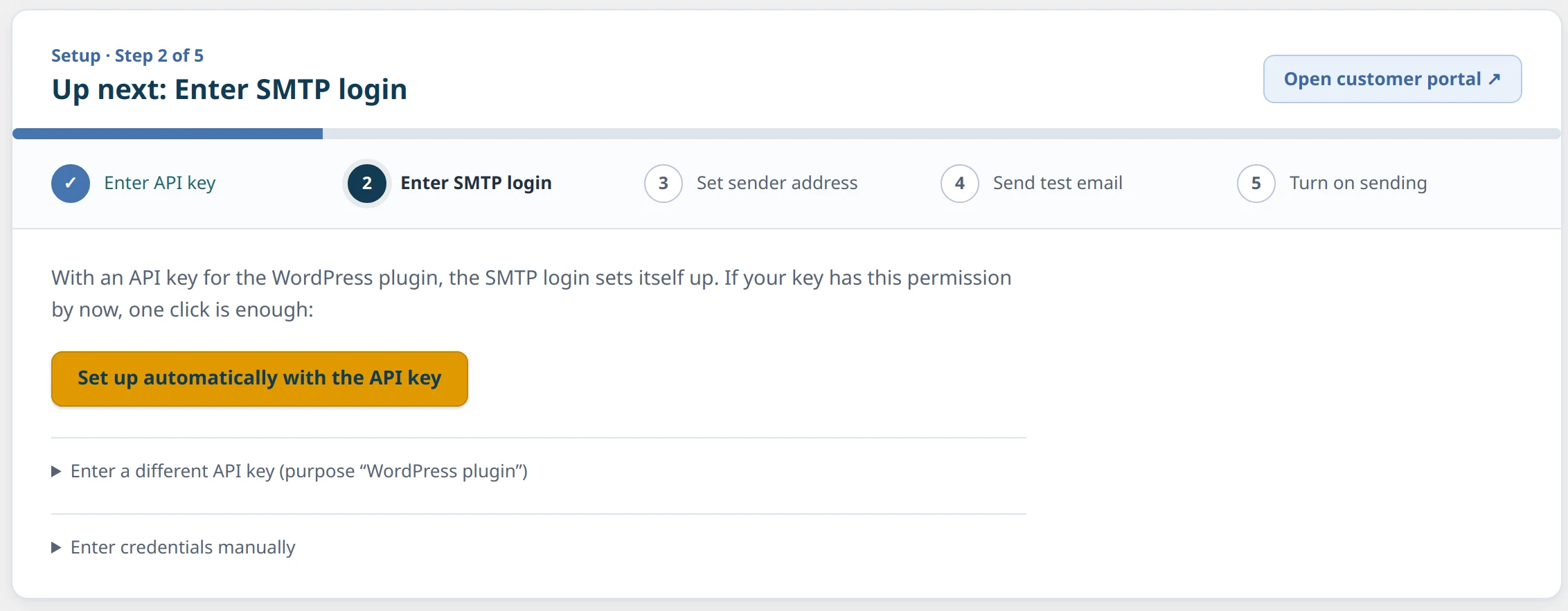
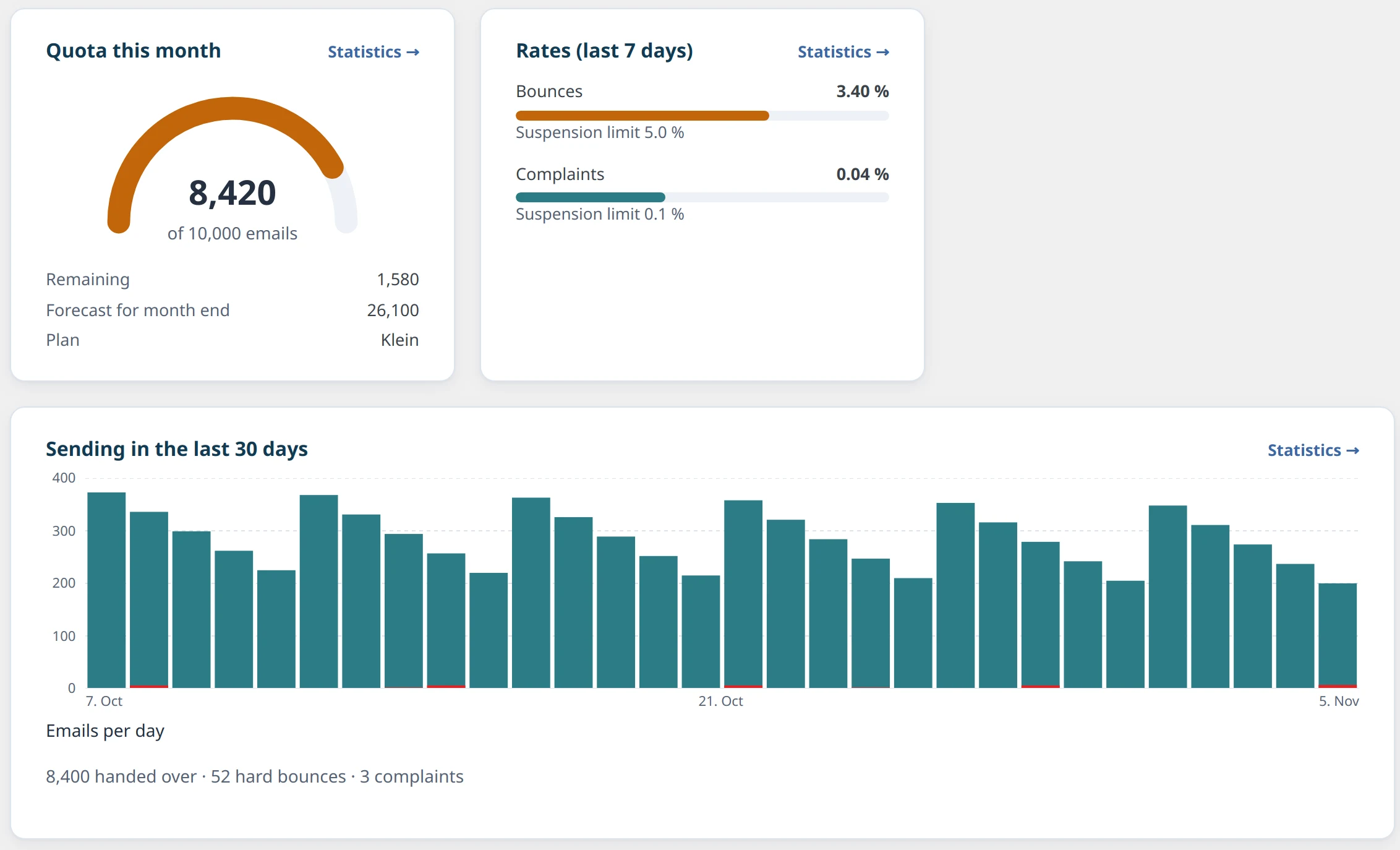
A tour of the plugin: setup, email log, newsletter plugins, statistics, protection and settings (3:55 min, with captions).
Already sending through another service?
Whether you currently use SendGrid, Mailgun or your own mail server: after ordering, you add the DNS records for your domain and replace server, port and credentials in your application. Your code does not change as long as your application speaks SMTP. If your domain is hosted with PureHost, we add the DNS records for you.
Talk to us about switchingSending you don’t have to worry about
- Good delivery
- Clean authentication, well-kept lists and an established sending infrastructure make sure your email arrives.
- Data protection, openly addressed
- Data processing agreement with PureHost, processing in the EU, sub-processors named openly in the agreement. More answers in the FAQ.
- No lock-in
- Standard SMTP and your own sender domain. Switching only means different credentials.
- Sending without the hassle
- Domain verification, limits, DNS and bounce analysis are handled by PureHost, with real people to talk to instead of an anonymous ticket loop.
Clear plans, fair pricing
Starter
€5per month, incl. VAT10,000emails per month2 emails/s, 2,000/hFor websites, forms and small shops.
Order StarterBusiness
€15per month, incl. VAT50,000emails per month5 emails/s, 10,000/hFor shops and applications that send regularly.
Order BusinessProfessional
€39per month, incl. VAT200,000emails per month10 emails/s, 40,000/hFor platforms and high-volume sending.
Order ProfessionalCustom
on requestpriced by volume
- Higher quotas
- Higher sending rates
- Dedicated IP on request
- Personal advice
Need more emails per month or higher sending limits? Talk to us.
Request a quote
Included in every plan
- 1 sender domain per plan
- SMTP with TLS (587 and 465)
- Portal with statistics
- WordPress plugin
- DKIM, SPF and DMARC
- Bounce and complaint tracking
- Queue for traffic peaks
- Sent from Germany
All prices incl. VAT. Emails beyond your quota optional at €1 per started 1,000.
Frequently asked questions
Can I use PureMails in compliance with the GDPR?
You conclude a data processing agreement (DPA) with PureHost. Processing and sending take place in data centres in the EU. We name the sub-processors we use in the DPA. Whether this is sufficient for your specific use is for you or your data protection officer to assess; we are happy to provide the documents.
How much does PureMails cost?
Starter: 10,000 emails for €5 per month. Business: 50,000 emails for €15 per month. Professional: 200,000 emails for €39 per month. Sending rate up to 2, 5 or 10 emails per second (2,000, 10,000 or 40,000 per hour). Each plan covers one sender domain. Emails beyond the quota optional at €1 per started 1,000. All prices incl. VAT. Higher quotas, sending rates and a dedicated IP are available on request.
Why not set up your own sending?
Running your own sending takes effort: domain verification, reputation, sending limits, processing bounces and complaints, and maintaining DNS records. With PureMails, PureHost does this work for you. You get a standard SMTP login and a personal contact.
How are SPF, DKIM and DMARC set up?
After ordering, the customer portal shows the DNS records for your sender domain: DKIM keys, the SPF include and a DMARC record. If your domain is hosted with PureHost, we add them for you. Sending from a domain is only possible once it has been verified.
May I send transactional email and newsletters?
Transactional email such as order confirmations, invoices, password links and notifications is the main purpose. Newsletters are possible if recipients have explicitly consented (double opt-in) and every message contains an unsubscribe option. Purchased or rented address lists are not allowed.
What happens with bounces and complaints?
Undeliverable addresses and spam complaints are recorded automatically. We evaluate them and contact you if addresses or rates become conspicuous. You should remove permanently undeliverable addresses from your list so that your domain’s reputation stays good.
How do I switch from another provider?
After ordering, you add the DNS records for your domain and replace server, port and credentials in your application. Your code does not change. More on this under “Switching to PureMails”.
Can I send newsletters straight from WordPress?
Yes, with any newsletter tool you like. Plugins that send through WordPress go through PureMails automatically with our official plugin; other tools enter the SMTP login. For FluentCRM, MailPoet, The Newsletter Plugin, Groundhogg, Icegram Express, Noptin and AcyMailing, the plugin also enters bounces and complaints into their lists automatically. Newsletters require the recipients’ explicit consent.
What is an SMTP relay?
An SMTP relay accepts email from your application over the standard mail protocol SMTP and delivers it to the recipients. Your application only needs to know server, port and credentials. PureMails is such an SMTP relay.
Ready for reliable delivery?
Choose a plan and order directly online. Questions beforehand or need help setting up your domain? We are happy to advise you personally.